
How the two importers work together
Placements come first, timesheets follow. A placement holds everything that stays the same over its lifetime: who earns commission on it and in what proportion, the worker, the company, the start date and, for permanent placements, the fee. Timesheets carry only what changes week to week, such as dates, hours, charge and pay, and each one is attached to a placement that already exists in Konquest.
If you're recording permanent business only, you only need the placements importer. If you're recording contract business, import your placements first and then use the timesheets importer to add billing as it comes in.
For more on how placements work in Konquest, see Getting started with placements.
Importing placements
The placements importer walks you through four steps: map your fields, map your beneficiaries, resolve any issues, then check and import. You can go back to an earlier step at any point before you start the import.
Choose your file and map your fields
From the import page, select Placements and choose your file.
You'll then match each column in your file to the placement field it represents. Konquest recognises most common column names and maps them for you automatically, so you'll usually only need to step in where a column isn't clear.
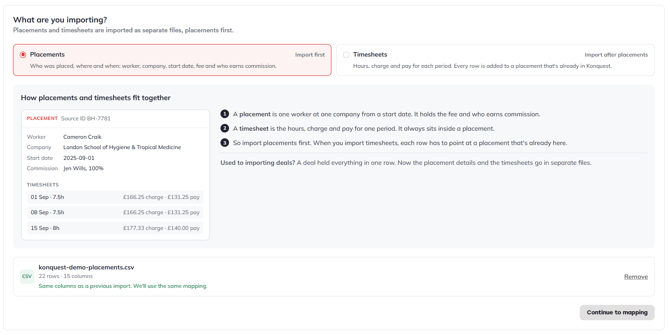
We recommend including a source ID for each placement. If your file has one, Konquest will ask which system the IDs come from. Pick from the list of known systems or type in your own. This prevents clashes where the same ID means different things in different places: for example, if your contract placements arrive through an integration while you upload permanent placements yourself, the same ID could otherwise refer to two different placements.

Map your beneficiaries
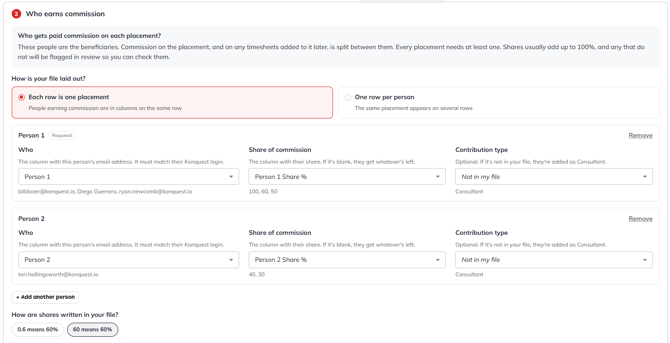
Beneficiaries are the people who earn commission on each placement. Konquest supports two file layouts:
- One row per placement. Each additional beneficiary has their own pair of columns, for example Person 1 and Person 1 Share, Person 2 and Person 2 Share, and so on. Map each pair.
- One row per beneficiary. Each beneficiary appears on their own row, so you only need to map the beneficiary and split columns once.
You can also map a contribution type for each beneficiary if you want to track it. Depending on how your account is set up, this could be the defaults (Consultant or Resourcer) or custom types of your own. Mapping it is optional.
Next, tell Konquest how your splits are written:
- Decimals between 0 and 1, where 0.6 means 60%
- Whole numbers up to 100, where 60 means 60%
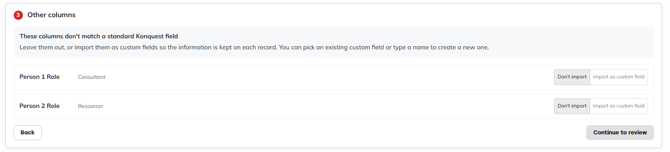
Any columns you haven't mapped yet are listed at the end of this step. If something you need appears here, such as a second beneficiary you missed, go back and map it. Any remaining columns you want to keep can be turned into custom fields.
Resolve any issues
Konquest checks every row before anything is imported, so problems are caught and fixed in the importer rather than discovered later on a statement.
First, choose whether the dates in your file are written day first (e.g. 05/10/2026 for 5 October) or month first (e.g. 10/05/2026 for 5 October).

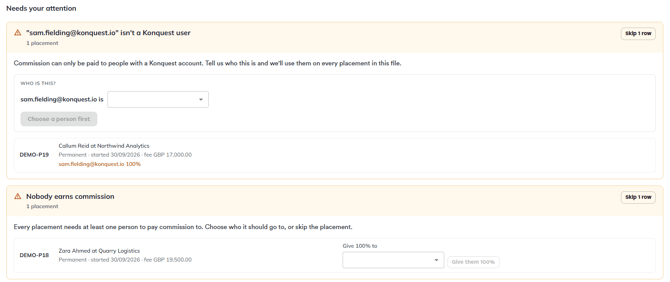
Konquest then lists any rows that need your attention. The most common issues, and how to resolve them, are:
| Issue | What to do |
|---|---|
| The beneficiary doesn't match a user in your account | Map them to the correct user |
| The placement has no beneficiaries | Choose a beneficiary and give them 100% |
| The splits don't add up to 100% | Accept as it is if this is correct, or adjust the splits |
| The currency isn't recognised (e.g. a typo such as "GPP") | Choose the correct currency from the dropdown |
| A permanent placement has no fee, or the fee isn't a number | Enter the correct fee |
| The worker, company or start date is missing | Add the missing detail |
| The placement type is missing or not recognised | Choose Permanent or Contract |
| A date is invalid (e.g. 30 February) | Select the correct date |
| The approval date isn't recognised | Choose the date it should be approved on, such as today's date |
For any issue, you can also choose to skip the row instead of fixing it.
Final checks and import
The final check shows your total fees, number of placements and number of commission earners, so you can compare them against the figures you expect before importing. You can still edit any value on this screen: if a placement should have been permanent rather than contract, for example, change it here.
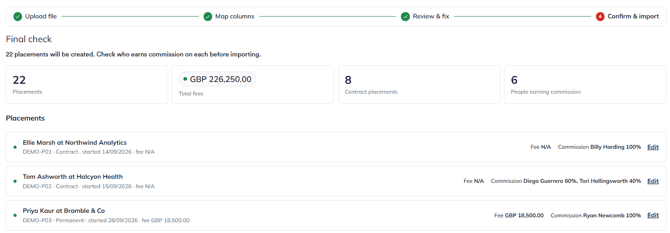
When you're happy, start the import. It usually takes a few seconds, and you can follow its progress in the side panel.
Importing timesheets
Because timesheets attach to existing placements, they only need a handful of core fields, which makes them much quicker to import. Before you begin, make sure the placements your timesheets belong to have already been imported. Konquest will check this with you when you select Timesheets.
Match your timesheets to placements and map your fields
Each timesheet needs to be attached to a placement. Choose how Konquest should find it:
- By worker, company and start date, matched together
- By the placement's source ID
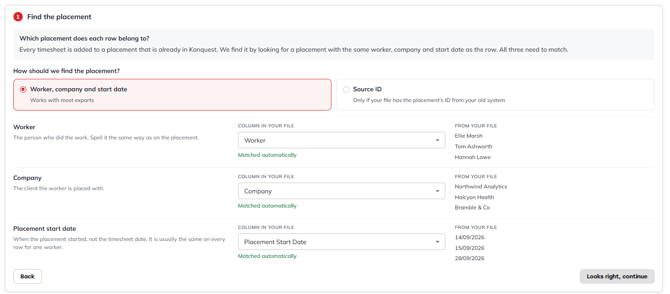
Then map your columns as you did for placements, checking that charge and pay are mapped correctly. As with placements, you can turn any extra columns into custom fields, such as a paid status or an invoice number.
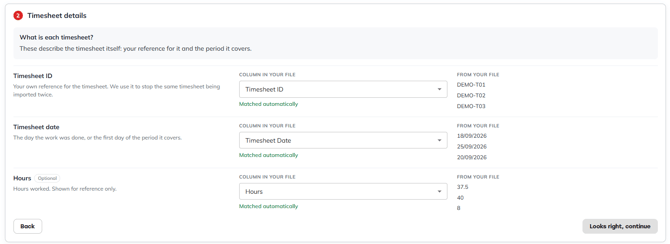
Resolve any issues
Konquest checks every row against your placements and flags any timesheets it can't match. You can correct the details and recheck, or skip those rows.
It then lists any other rows that need attention. The most common issues are:
| Issue | What to do |
|---|---|
| The currency isn't recognised | Choose the correct currency from the dropdown |
| The timesheet has no ID | Give it one |
| The timesheet date is missing or invalid | Enter the correct date |
| The charge or pay amount is missing or invalid | Enter the correct amount |
| The number of hours contains text | Replace it with a number |
| The worker is missing, so the timesheet can't be matched | Add the worker and recheck, or skip the row |
A blank charge or pay amount is treated as a data problem, not as zero. If a timesheet genuinely has a zero charge or pay, enter 0.
Issues are grouped by placement rather than listed line by line, which keeps long files manageable. You can open any group to work through its rows.
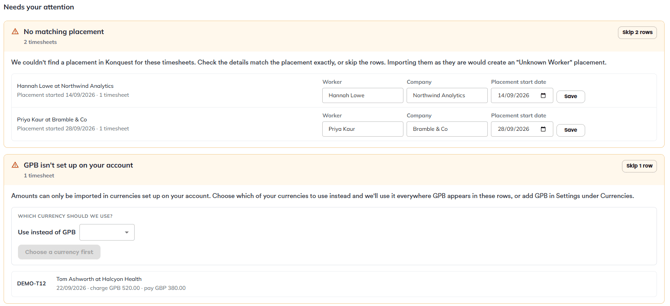
Final checks and import
The final check shows your total charge and total margin, and you can still edit any row. If a row's charge and pay are in different currencies, its margin won't be shown on this screen; Konquest applies the correct exchange rate when it imports.
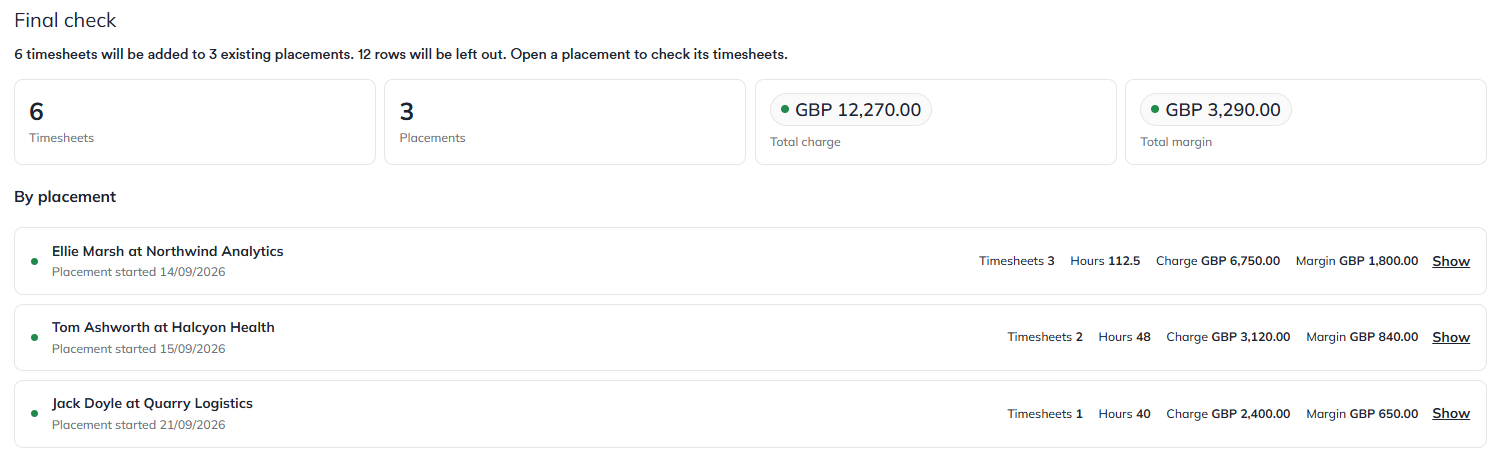
Start the import when you're ready. If you skipped any rows, you can download them, correct them in your file and import them again afterwards.
Saving your column choices
At the final check of both importers, leave Remember column choices ticked. Konquest saves your column mapping in your browser, so the next time you upload a file with the same columns it recognises them and you can skip the mapping step entirely.
Because the mapping is saved in your browser, it won't carry over if you import from a different browser or device, or after clearing your browser data.

Summary
- Konquest has separate importers for placements and timesheets. Import placements first; timesheets attach to them.
- Include a source ID for each placement and tell Konquest which system it comes from, to avoid clashes between sources.
- Beneficiaries can be laid out one row per placement or one row per beneficiary, with splits written as decimals or whole numbers.
- Tell Konquest whether your dates are day first or month first.
- Konquest flags issues row by row before importing. Fix them or skip the row, and download skipped timesheet rows to correct and re-import later.
- Use the totals on the final check screen to confirm your figures before importing.
- Leave Remember column choices ticked to skip mapping next time.
Getting your data in cleanly is the foundation of accurate commission. Import your placements once, add timesheets as often as you need, and let Konquest catch the problems along the way, so every statement reflects the business your team has actually done and there are no surprises on pay day.