
Why this matters
Konquest doesn't automatically exclude billings for deactivated users from team totals — this is by design. If a deactivated user is left in a team with no end date on their enrolment, any billings against them will keep counting towards that team's billings indefinitely, even though the user themselves can no longer log in.
Most of the time this isn't actually an issue. If the leaver worked a perm desk, for example, no further perm placements will typically occur against them once they've left, so nothing further accrues to the team and the situation resolves itself.
It becomes more relevant in contract scenarios, where a placement can continue generating billings well beyond the end of the user's tenure. Here you may want to cut off any further benefit to the team (and team leader) once the user has departed, rather than letting those ongoing contract billings keep counting.
One way to handle this is by setting effective dates on the placement beneficiaries themselves, rather than at the team level. Konquest supports this in the UI, and via the Bullhorn integration using custom objects — if this is something you'd like to explore, contact Konquest Support.
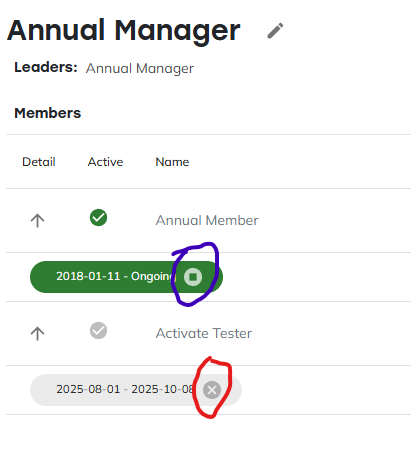
How to end a team enrolment
- Go to Teams > [Team Name] > Members.
- Find the user's active enrolment — shown in green with a start date and "Ongoing" end date.
- Click the stop icon (blue circle) on that row.
This ends the enrolment at the current date and moves it into the grey, inactive state. The user's historic billings are preserved, and only billings from after this point stop counting towards the team.
Removing an enrolment entirely
Once an enrolment has ended, you'll also see an x icon (red circle) on that row. This does something different — it removes the enrolment entirely, as if the user had never been on the team.
Use this with caution. Removing an enrolment this way also removes all of that user's historic billings from the team's totals. In most cases this isn't what you want, since it can cause unexpected clawbacks for the team leader, whose figures were calculated with those billings included. Ending the enrolment (the stop icon) is the right choice for almost all leaver scenarios — the x icon is only for correcting a team enrolment that shouldn't have been created in the first place.
If you made a mistake
If you've ended or removed an enrolment incorrectly, you can re-enrol the user with the exact dates you need to reconstruct their correct team tenure.
Need help?
If you're not sure whether to end or remove a team enrolment for a specific user, or want to explore effective dating at the placement level, contact your Konquest support contact with the user and team involved.