---
title: A guide to your manager dashboard
description: An overview of the manager dashboard in Konquest, covering team performance, statements, account-wide placements, and team forecasting.
---
[Skip to content](https://konquest.io/en-gb/knowledge-base/a-guide-to-your-manager-dashboard#main-content)
English - United Kingdom
Show submenu for translations

Open main navigation
Close main navigation
- English - United Kingdom
Show submenu for translations
- [Contact us](mailto:support@konquest.io)
[Contact us](mailto:support@konquest.io)
How can we help you?
- There are no suggestions because the search field is empty.
1. [Konquest](https://konquest.io/en-gb/knowledge-base?hsLang=en-gb)
2. [Managers](https://konquest.io/en-gb/knowledge-base/managers?hsLang=en-gb)
# A guide to your manager dashboard
## As a manager, your Konquest view is built around your team rather than just your own billings, giving you visibility over everyone reporting to you and the tools to act when something needs attention. This article walks through each part of the manager experience, from your team overview through to statements, placements, and forecasting.
### Summary
Your manager view gives you oversight of your whole team, made up of the following:
- **Team overview** — a list of your team members with what they stand to earn, what they've billed, and any flagged issues
- **Statements** — a full breakdown of each team member's commission by scheme, billing item, and calculation
- **Payable section** — any clawbacks, late payments, or other updates carried over from previous periods
- **Reviewing statements** — flag a problem or confirm it looks good, with visibility over both your own and your team's review status
- **Placements** — an account-wide view of everything billed
- **Values view** — the computed margin behind a placement, the same view available to consultants
- **Forecast** — a team-level projection, with the ability to drill into any period for a full team breakdown
### Team overview
**When you land in Konquest, you'll see a list of all your team members, with an at-a-glance view of what they stand to earn and what they've billed.** This gives you an immediate sense of how your team is tracking, and flags up any issues that need your attention.

### Statements
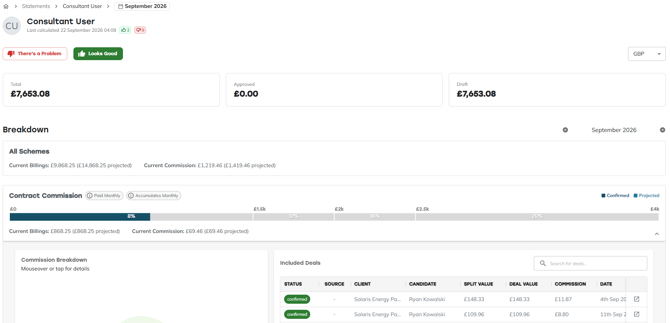
**From the team overview, you'll most often want to go into a statement to see the detail behind it.** Just as with the consultant view, you can break the statement down to see every billing item contributing to each commission scheme, how much commission has been earned on each item, and the full breakdown of how that calculation was reached.
#### Payable section
**At the bottom of the statement, the Payable section shows any updates carried over from previous periods** — clawbacks, late payments, or anything else that's changed since the period closed. Review this alongside the rest of the statement to make sure everything looks correct.

#### Reviewing statements
**Once you've reviewed a statement, you can flag it at the top of the page.** If something doesn't look right, leave a comment describing the issue — this is sent through to your admins, who'll be notified and can act on it. You'll see the status update once they have.
Both your review and your team member's review are tracked separately, so you might see a thumbs up from the consultant while you flag a further issue of your own. Once your admins have resolved it, come back and select **Looks good** to add your own thumbs up.
### Placements
**Managers get a broader view of placements than consultants — you can see every placement across the whole account, not just the ones you've contributed to.** This reflects that managers are typically aware of everything going on within their team, so you can see what everyone's billed across the account in one place.

#### Values view
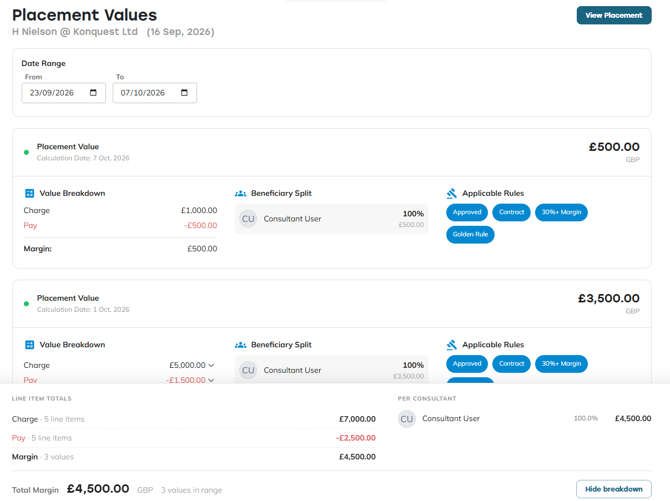
**As with the consultant experience, you can open the Values view from any placement to see the computed margin behind it.** For a permanent placement, this shows as a single value. For a contract placement, you'll see a series of values across the different billing rates. Either way, it gives you the detail you need to check over your team's billings and confirm everything's been captured correctly.
### Forecast
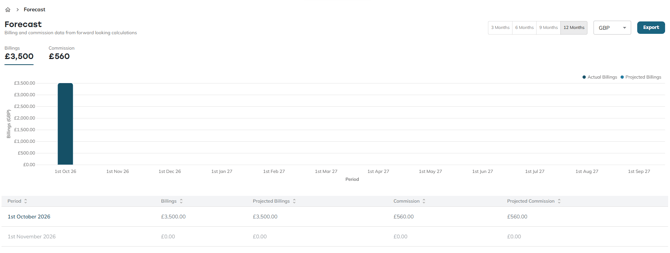
**Your Forecast page shows the projected commission for your entire team, not just your own.** This is useful information to have ahead of conversations with your team about how they're tracking. Click into any period to see a full breakdown of what each team member stands to earn, giving you the detail you need to have those conversations and incentivise your team accordingly.
### Stay ahead of your team's commission
With your team's performance, statements, and forecasts all in one place, you don't need to wait for questions to come to you. Check in regularly, review statements as they come through, and use the forecast to guide your conversations — so you can catch issues early and keep your team confident about what they're earning.
- [Integrations](https://konquest.io/en-gb/knowledge-base/integrations?hsLang=en-gb#main-content)
- [MCP](https://konquest.io/en-gb/knowledge-base/integrations?hsLang=en-gb#mcp)
- [Consultants](https://konquest.io/en-gb/knowledge-base/consultants?hsLang=en-gb)
- [Managers](https://konquest.io/en-gb/knowledge-base/managers?hsLang=en-gb)
- [Statements](https://konquest.io/en-gb/knowledge-base/statements?hsLang=en-gb#main-content)
- [Updates](https://konquest.io/en-gb/knowledge-base/statements?hsLang=en-gb#updates)
- [Placements](https://konquest.io/en-gb/knowledge-base/placements?hsLang=en-gb#main-content)
- [Placement Rules](https://konquest.io/en-gb/knowledge-base/placements?hsLang=en-gb#placement-rules)
- [Import](https://konquest.io/en-gb/knowledge-base/placements?hsLang=en-gb#import)
- [Teams](https://konquest.io/en-gb/knowledge-base/teams?hsLang=en-gb#main-content)
- [Team Enrolments](https://konquest.io/en-gb/knowledge-base/teams?hsLang=en-gb#team-enrolments)
- [Users](https://konquest.io/en-gb/knowledge-base/users?hsLang=en-gb)
[mailto:support@konquest.io](mailto:support@konquest.io)
Copyright © 2026, Konquest
```json
{
"@context" : "https://schema.org",
"@type" : "VideoObject",
"caption" : {
"@type" : "MediaObject",
"contentUrl" : "https://konquest.io/media-transcripts/222441801016/en.vtt",
"inLanguage" : "en",
"name" : "en Captions"
},
"contentUrl" : "https://4729779.fs1.hubspotusercontent-na1.net/hubfs/4729779/video_assets/222441801016/inherited/web_optimized.mp4",
"dateModified" : "2026-09-22T09:38:35.205Z",
"duration" : "PT2M28S",
"height" : 720,
"name" : "Konquest - Manager Experience Guide",
"thumbnailUrl" : "https://4729779.fs1.hubspotusercontent-na1.net/hubfs/4729779/Konquest%20-%20Manager%20Experience%20Guide.mp4/medium.jpg",
"uploadDate" : "2026-09-22T09:38:28.812Z",
"width" : 1280
}
```