---
title: A guide to your consultant dashboard
description: An overview of the consultant dashboard in Konquest, covering performance tracking, placements, statements, and forecasting.
---
[Skip to content](https://konquest.io/en-gb/knowledge-base/a-guide-to-your-consultant-dashboard#main-content)
English - United Kingdom
Show submenu for translations

Open main navigation
Close main navigation
- English - United Kingdom
Show submenu for translations
- [Contact us](mailto:support@konquest.io)
[Contact us](mailto:support@konquest.io)
How can we help you?
- There are no suggestions because the search field is empty.
1. [Konquest](https://konquest.io/en-gb/knowledge-base?hsLang=en-gb)
2. [Consultants](https://konquest.io/en-gb/knowledge-base/consultants?hsLang=en-gb)
# A guide to your consultant dashboard
## Your Konquest dashboard brings together your performance, your billings, and your commission in one place, so you always know where you stand. This article walks through each part of the dashboard, from your overall performance snapshot through to your statement and forecast.
#### Summary
Your dashboard gives you a complete view of your performance and commission, made up of the following:
- **Performance overview** — your billings and commission over Year to Date, This Quarter, Last Quarter, or a custom period
- **Billings and Commission** — a running total for the selected period, tracked against any thresholds set on your account
- **What's Changed** — a month-on-month comparison of your current performance
- **Leaderboard** — your position relative to your team, plus the top performer
- **Commission Goals** — a personal earnings target that tracks automatically against your approved commission
- **Placements list** — every billing you've contributed to, with detail down to individual placements and the margin behind each figure
- **Your statement** — your current period broken down by scheme, band, and billing item, including any updates carried over from previous periods
- **Reviewing your statement** — flag a problem or confirm it looks good before your admin approves the period
- **Forecast** — a projection of your commission as far into the future as Konquest has data for
### Performance overview
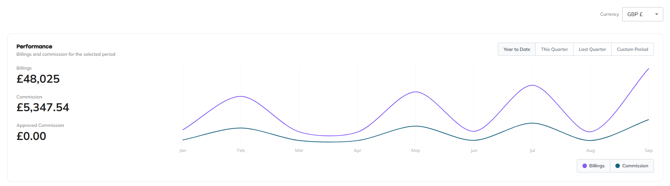
**At the top of your dashboard, an overview chart shows your billings and commission over whichever period you choose.** You can switch between Year to Date, This Quarter, Last Quarter, or set a Custom Period, so you can track your performance over the timeframe that matters most to you and see how it's tracking against your commission.
#### Billings and Commission
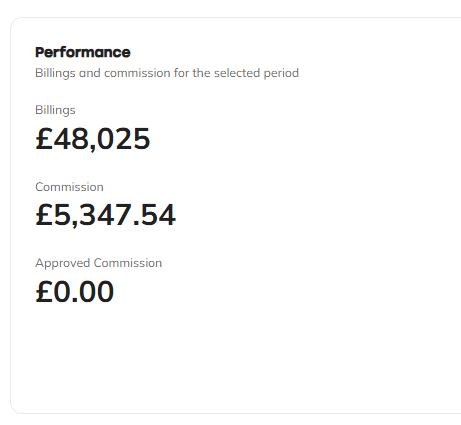
**Next to the overview chart, the Billings and Commission section gives you a running total for the current period.** This shows how much you've billed, how much commission you've earned, and how much of that has been approved. If you have thresholds set on your account, you'll also be able to track your progress against them here.
#### What's Changed
**The What's Changed section shows your current month's performance and commission alongside a comparison with the previous month.** This gives you a quick way to see whether you're trending up or down month on month, without having to dig into the full statement.

#### Leaderboard
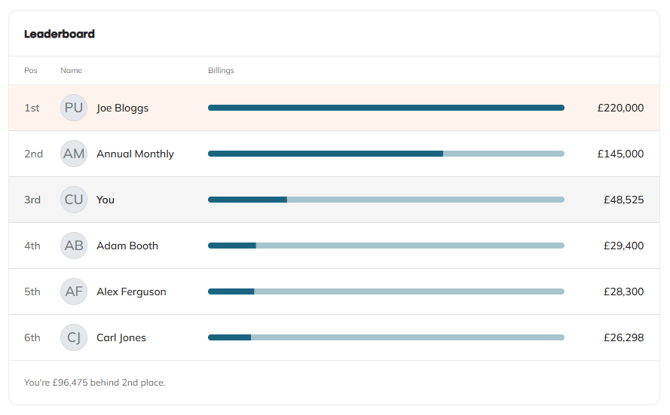
**The leaderboard shows where you sit relative to the rest of your team, with your own position always highlighted.** You'll also always see the top performer, so you know exactly what it takes to move up the board.
#### Commission Goals
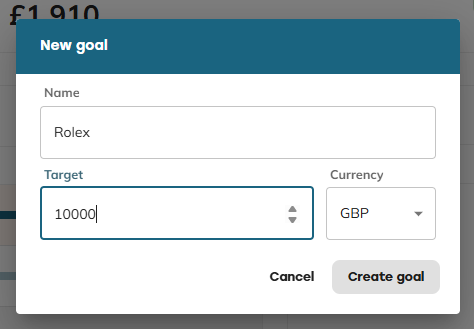
**Commission Goals let you set your own personal earnings target, which your approved commission is automatically tracked against.** Whether you're saving for something specific or just want an extra way to stay motivated, your goal updates automatically as your commission is approved — no manual tracking needed.
### Placements list
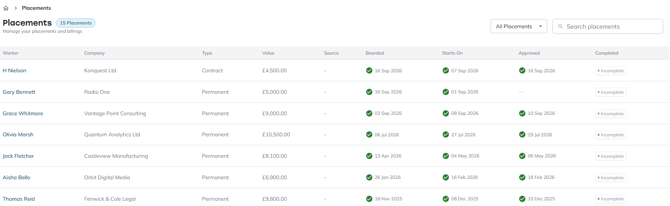
**The placements list shows every billing you're a contributor to — and only the ones you've contributed to directly.** You can search by worker, company, or any other field, and you can also search using any rules set up on your account, such as billing type or other qualifying criteria configured for your business. Available search options will vary depending on how your account is set up.
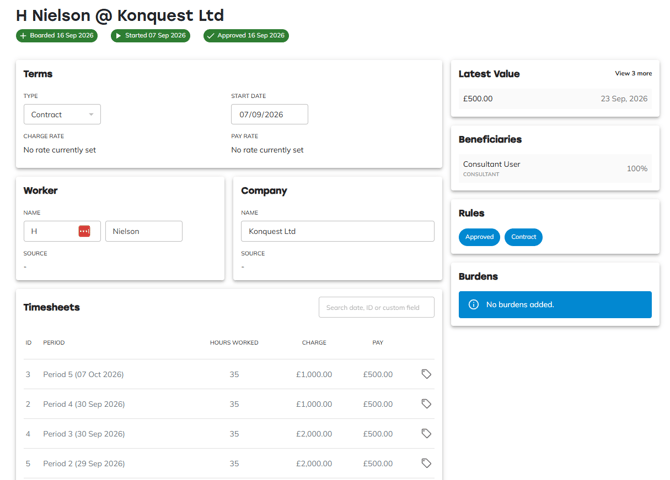
Clicking through to a placement shows you:
- The full billing history for that placement
- Any custom fields applied to it
- Any rules that have qualified against it
- The other beneficiaries associated with the placement
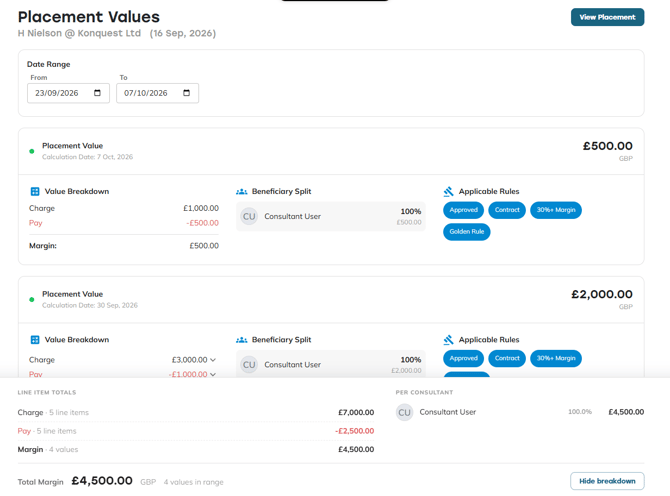
From here, you can also click through to the **Values view** — a calculated breakdown based on the exact margin contributing to your commission calculation.
### Your statement
**Your statement view shows your current accumulation period, broken down by scheme** — for example, if you're enrolled on separate schemes for contract and permanent business, or as part of a team, you'll see each one broken out individually.
Within each scheme, you can see:
- The full list of billing items contributing to that period
- A breakdown of how each item contributes to a particular band
- The commission calculated for each individual billing item
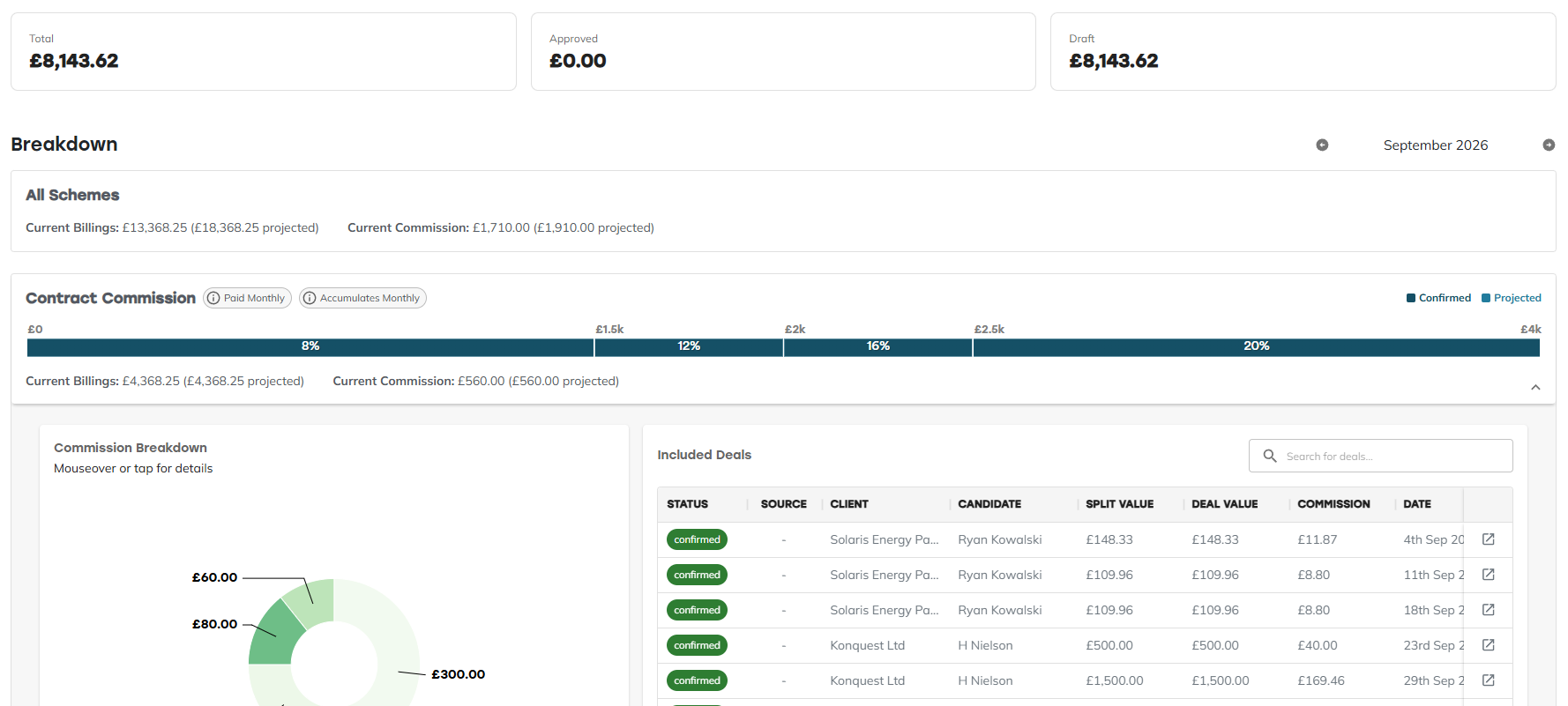
From any billing item, you can click through to the placement, and from there to the Values view, to see exactly how the margin behind that commission figure has been arrived at.
#### Payable section
**At the bottom of your statement, the Payable section shows any updates carried over from previous periods.** This is where you'll see things like:
- A dropout that's reduced a previous payment (shown as a clawback)
- Billings that were missed in an earlier period and have now come through
- Commission that was held back under a pay-when-paid arrangement, now that payment has been received

#### Reviewing your statement
**At the top of your statement, you can let your admin know whether everything looks right.** If something looks off, select **There's a problem** and add a short description — this goes straight to your admins so they can look into it. If everything looks correct, select **Looks good** to give it a thumbs up. This lets your admin see you've already reviewed it when they come to approve the period.

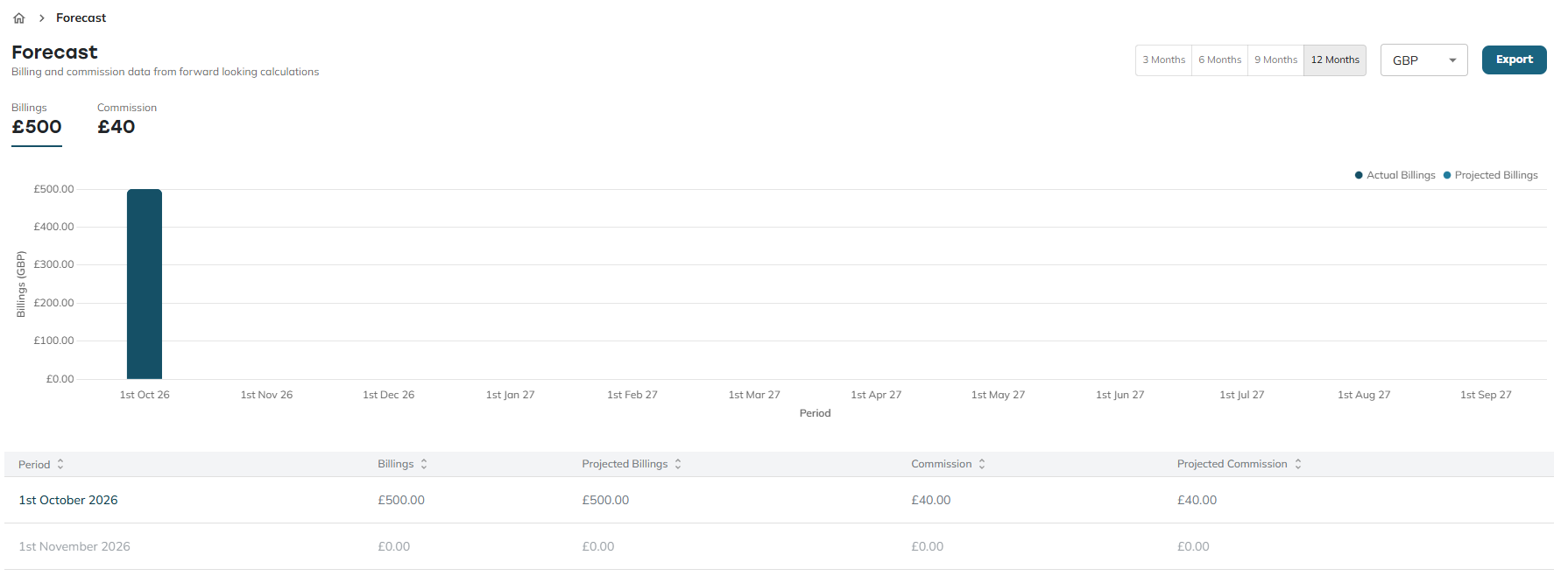
### Forecast
**The Forecast page projects your commission as far into the future as Konquest has data for.** If you have a placement that doesn't start until next year, for example, Konquest will still calculate a projected commission for it. Because forecasts are based on the billings in the system at the time, they'll naturally move as more billings are added and accumulation changes — but you'll always see the most up-to-date projection available.
### Take control of your commission
With everything from your live performance to your forecasted earnings in one place, there's no need to wait until pay day to find out where you stand. Check in on your dashboard regularly, keep an eye on your statement as the period progresses, and flag anything that doesn't look right as soon as you spot it — so your commission is never a surprise.
- [Integrations](https://konquest.io/en-gb/knowledge-base/integrations?hsLang=en-gb#main-content)
- [MCP](https://konquest.io/en-gb/knowledge-base/integrations?hsLang=en-gb#mcp)
- [Consultants](https://konquest.io/en-gb/knowledge-base/consultants?hsLang=en-gb)
- [Managers](https://konquest.io/en-gb/knowledge-base/managers?hsLang=en-gb)
- [Statements](https://konquest.io/en-gb/knowledge-base/statements?hsLang=en-gb#main-content)
- [Updates](https://konquest.io/en-gb/knowledge-base/statements?hsLang=en-gb#updates)
- [Placements](https://konquest.io/en-gb/knowledge-base/placements?hsLang=en-gb#main-content)
- [Placement Rules](https://konquest.io/en-gb/knowledge-base/placements?hsLang=en-gb#placement-rules)
- [Import](https://konquest.io/en-gb/knowledge-base/placements?hsLang=en-gb#import)
- [Teams](https://konquest.io/en-gb/knowledge-base/teams?hsLang=en-gb#main-content)
- [Team Enrolments](https://konquest.io/en-gb/knowledge-base/teams?hsLang=en-gb#team-enrolments)
- [Users](https://konquest.io/en-gb/knowledge-base/users?hsLang=en-gb)
[mailto:support@konquest.io](mailto:support@konquest.io)
Copyright © 2026, Konquest
```json
{
"@context" : "https://schema.org",
"@type" : "VideoObject",
"caption" : {
"@type" : "MediaObject",
"contentUrl" : "https://konquest.io/media-transcripts/222365844914/en.vtt",
"inLanguage" : "en",
"name" : "en Captions"
},
"contentUrl" : "https://4729779.fs1.hubspotusercontent-na1.net/hubfs/4729779/video_assets/222365844914/inherited/web_optimized.mp4",
"dateModified" : "2026-09-21T11:18:29.176Z",
"duration" : "PT2M53S",
"height" : 720,
"name" : "Konquest Dashboard — Consultant Help Guide - FINAL",
"thumbnailUrl" : "https://4729779.fs1.hubspotusercontent-na1.net/hubfs/4729779/Konquest%20Dashboard%20%E2%80%94%20Consultant%20Help%20Guide%20-%20FINAL.mp4/medium.jpg",
"uploadDate" : "2026-09-21T11:18:21.882Z",
"width" : 1280
}
```